We are excited to unveil the new ‘Data View’ tab, accessible from within the Single Measure View. This feature is designed to extend your data analysis beyond our HDC Discover application, making data comparison more intuitive and familiar utilizing an exportable tabular format. The new tab presents a table that mirrors the data used in the charts, derived from your selected data sources and tailored to the time frame you’ve chosen on the graph. In addition, you can now export this data using the ‘Export to CSV’ feature, making it easier to share and analyze insights with your peers.
Imagine you want to explore trends in the percentage of patients with “active” status in the EMR who have been seen in the past three years. Here’s how you can access your data in tabular format:
How to Access the Data View Tab
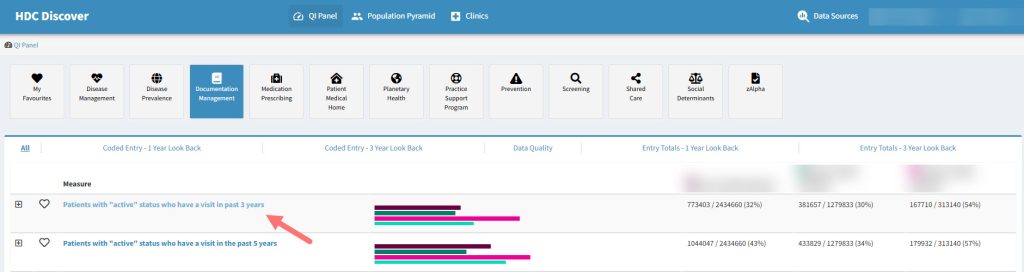
- Search for the Measure: Navigate to the QI Panel, click on the Documentation Management domain, and look for “Patients with active status who have a visit in the past 3 years.” Click on the measure name to access the Single Measure page.
- Confirm your Data Sources: Verify that you have the desired data sources selected for data comparison. When in the Single Measure view, a user can select up to 15 data sources to view in tabular form and export to CSV if appropriate. Click here to learn more about selecting and prioritizing your data sources.
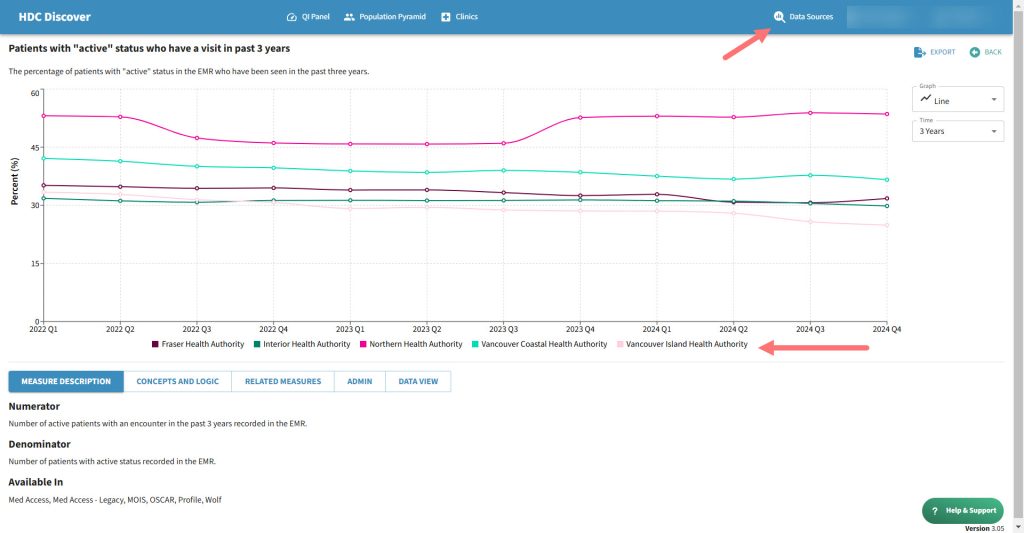
- Locate the Data View Tab: Below the Single Measure View, you will find a list tabs. Click on the ‘Data View’ tab to access the table.
- View the Data: The table under the ‘Data View’ tab displays your data over time, broken down by quarters for the selected period. The left column lists your data sources, while the rows display corresponding data values.
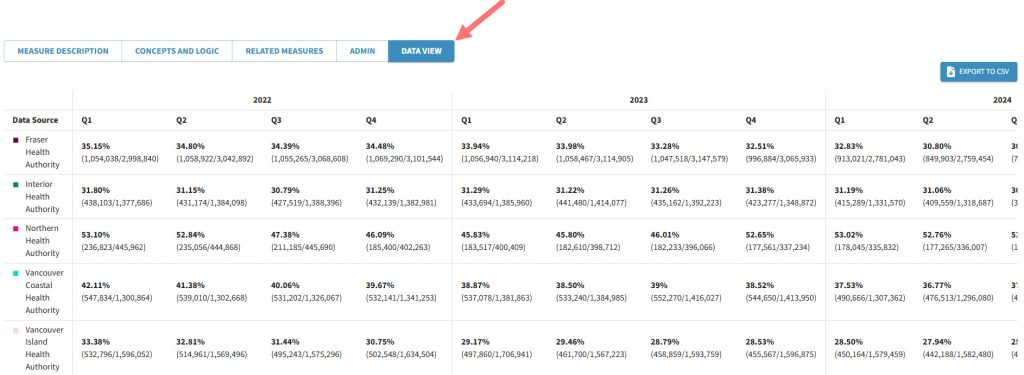
- Export for Sharing or Analysis: Need to investigate further or share results? Simply click the ‘Export to CSV’ button to download the data for offline use.
This feature allows you to view your data in a new way that compliments the different charts with detailed tables for a comprehensive understanding.
Privacy and Exports:
All Exports of data from HDC Discover are the results of our measures, there is no way to export identifiable patient data.
When exporting data, you may be choosing to include the identities of the peers who have entrusted you with their data. Please ensure you have their permission to share their identity.
Additionally, when sharing data outside of the HDC application we require you to cite the source of the data – i.e. This data is coming from HDC Discover and is representative of the sample of clinics that are contributing to our platform.