The Single Measure View in the HDC Discover app offers a simple and secure way to export relevant health data without the worry of revealing private information. This feature allows you to focus on the measure aggregates you need, whether for analysis or presentations, ensuring that only the appropriate information is shared.
Imagine you want to add a presentation slide that compares documentation trends for coded health conditions across your practice, your clinic, and your division. Follow this step-by-step guide to effectively use the export feature:
- Find the Measure:
- On the QI Panel, select the Documentation Management domain and look for the Coded Entry – 3 Year Look Back subdomain.
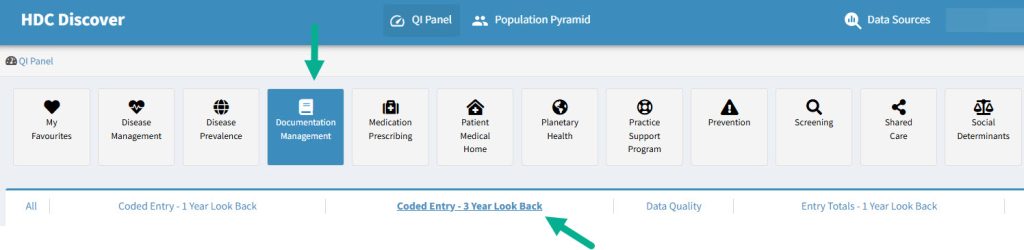
- Click on the Patients with coded health conditions You can also click here to get to that measure.
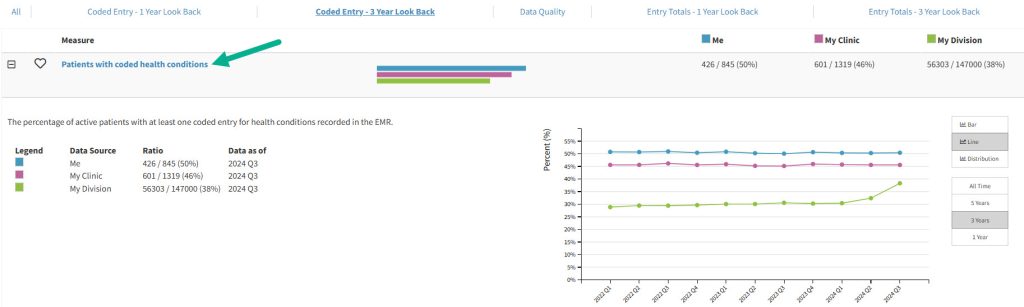
- This action takes you directly to the Single Measure View, where you can view your data against that measure.
- On the QI Panel, select the Documentation Management domain and look for the Coded Entry – 3 Year Look Back subdomain.
- Check Data Sources:
- Ensure you have the correct data sources selected. Click here to learn how to customize your data sources.
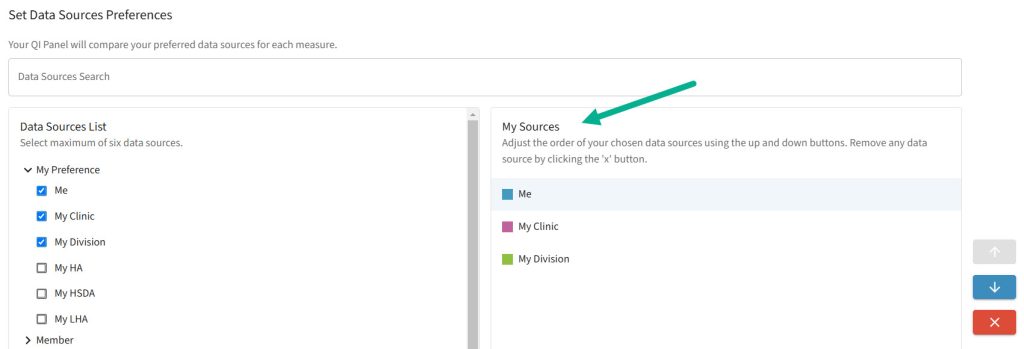
- Ensure you have the correct data sources selected. Click here to learn how to customize your data sources.
- Export the Data:
- In the Single Measure View, locate the Export button in the top right corner of the screen. Click on it to begin the export process.
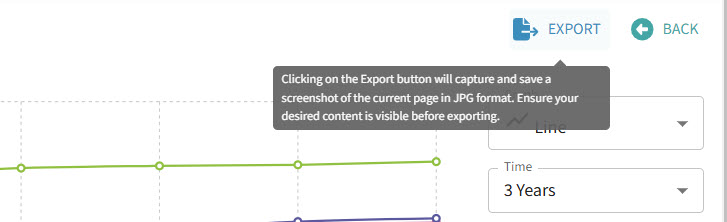
- In the Single Measure View, locate the Export button in the top right corner of the screen. Click on it to begin the export process.
- Customize Your Export:
- A pop-up dialog will appear, offering options to customize your export. Here’s what you can do:
- Graph and Time Selection: Choose the type of graph you want and the time period for which you want to view the data (e.g., the last three years).
- Measure Information: Specify what measure details you want to see in the export.
- Data Sources: If you wish to include the names of the data sources in the export, select this option. By default, this is turned off for privacy reasons, but you can enable it if necessary.

- A pop-up dialog will appear, offering options to customize your export. Here’s what you can do:
- Complete the Export:
- Once you’ve made your selections, click the Export The export will save the data as an image file, which you can then use in presentations, reports, or any other context without worrying about privacy issues.
The export feature is particularly useful in scenarios such as conferences or team meetings, where you need to showcase trends without manually editing or hiding sensitive information. With this tool, you can share data visualizations, knowing that privacy is protected.