With over 400 measures available in HDC Discover across a variety of topics and conditions, finding the right measure can sometimes feel overwhelming. Whether you’re working on a specific quality improvement project, monitoring a particular patient population, or exploring new opportunities for practice improvement, there are several ways to quickly find the measures that matter most to you.
This month, we’re highlighting different ways to search more efficiently.
Looking for a Specific Measure?
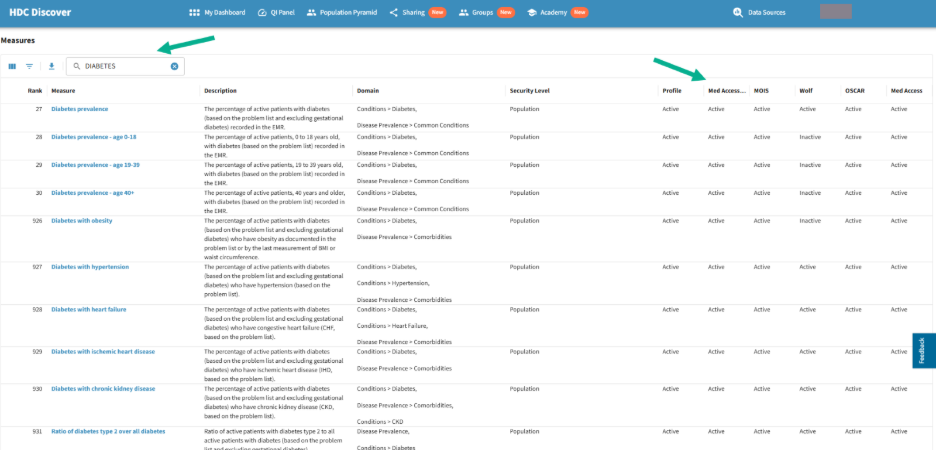
You can either browse measures through the QI Panel domains or search directly using the Measures page. The Measures page serves as a complete directory of all measures available in HDC Discover. In addition to searching for measures by keyword, you can also view which EMRs support each measure, helping you quickly confirm whether a measure is available for your practice.
Example: Finding measures related to Diabetes
Since November is Diabetes Awareness Month, let’s search for measures related to diabetes.
Option 1: Measures Page
- Click your account name and select Measures.
- Enter “Diabetes” in the search box.
- A list of all diabetes-related measures will appear.
- Select the measure you’d like to explore.
Check EMR Availability
Before you start working with a measure, you may also want to confirm whether it is supported by your EMR.
On the Measures page, you’ll see columns listing supported EMRs. If a measure is available for your EMR, the corresponding column will display Active.
This allows you to quickly verify whether a measure is currently supported for your practice and available for reporting.
Option 2: QI Panel
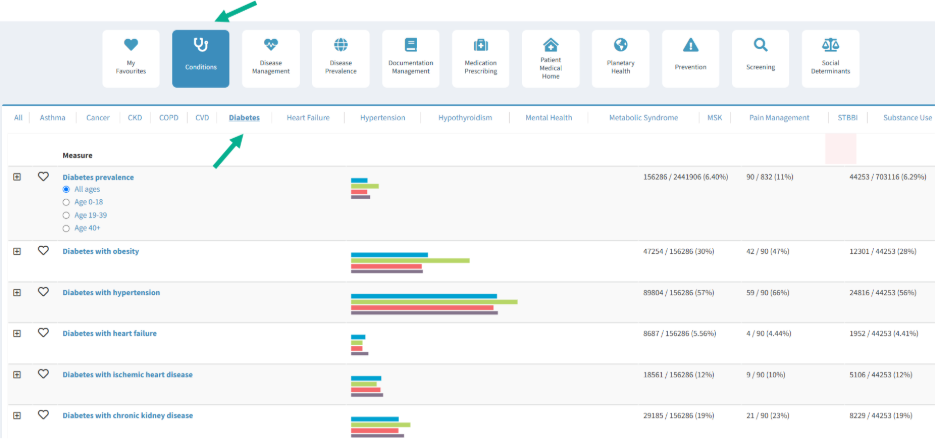
- Click on the Conditions domain.
- Select the Diabetes sub-domain.
- Review the list of diabetes-related measures.
- Select the measure you’d like to explore.
Take a Few Minutes to Explore
With hundreds of measures available, becoming familiar with the QI Panel domains can save you time and help you focus your search on different aspects of your primary care practice to discover valuable insights about your panel and practice.
Whether you prefer browsing by domain, filtering by condition, or searching directly from the Measures page, HDC Discover offers multiple ways to quickly find the information you need.