Inviting HDC users or clinics to share data supports direct collaboration and allows the exchange of insights at both the individual and organizational level. This feature helps facilitate collaboration across users, clinics, and Divisions of Family Practice, enabling broader engagement and shared learning.
HDC Discover now makes it easier to see when you’ve been invited to join a new group or when you’ve received a new sharing invitation.
How it works:
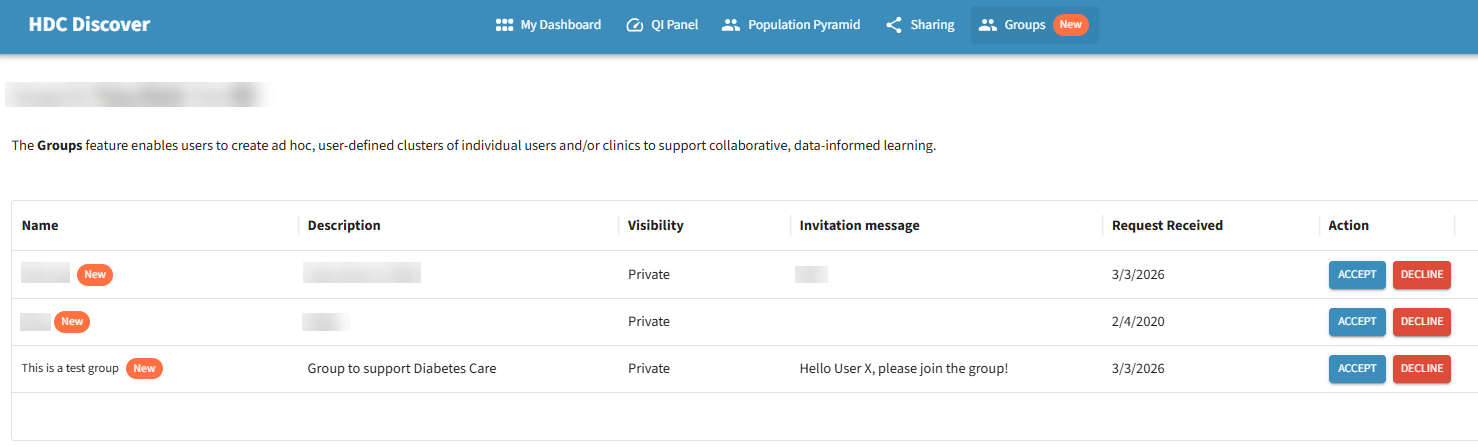
Let’s assume User X receives an invitation to join a group focused on improving Diabetes Care.
User X will be notified in two ways:
- Email notification informing them of the new invitation
- In-app notification badge in the navigation menu

When User X logs into the app, they will see the badge on the Groups menu. Selecting this menu will show the invitation at the top of the page, allowing them to quickly review and respond.
Invitations for Users Associated With Multiple Clinics
Users associated with multiple clinics may receive invitations linked to their account in a specific clinic.
When the invitation email link is opened:
- The system identifies the clinic associated with the invitation.
- If the current clinic in the application does not match, the application prompts the user to switch to the correct clinic.
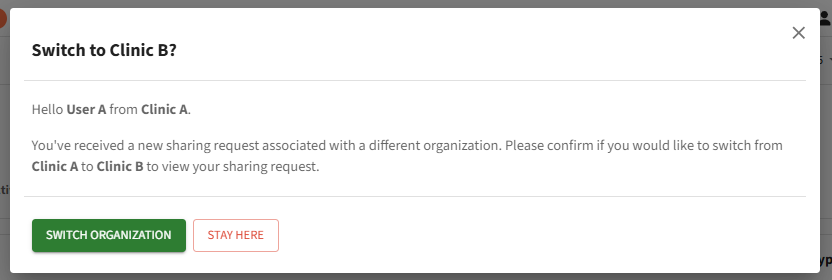
- After switching, the user can navigate to the relevant page and respond to the invitation.
- To view this new data source, navigate to the data source preferences and select your new shared member or clinic aggregate data or select the new group you now have permission to view. These new data sources will now be available to view in your QI panel.