Version 3.20 was released to production on January 20th 2026. Please do not hesitate to contact our support email support@hdcbc.ca should you have any questions or comments about any of these changes.
What’s New?
1. Sharing Page – A Cleaner, Smarter Experience
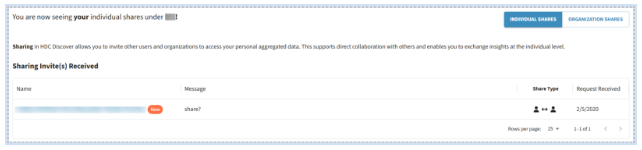
We’ve redesigned the Sharing Page to deliver a cleaner, smarter experience that makes managing invites and shares effortless. Now, everything you need is organized and easy to access.
Manage Invites
- All received invites now appear in a dedicated section at the top of the page, making it easy to find and for users to accept or decline.
- A New badge highlights fresh invites. If there are no new invites, the section stays hidden so users can focus on their existing shares.
View All Shares:
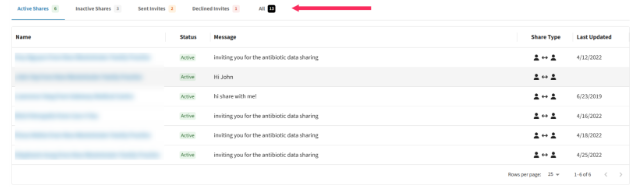
To avoid status clutter, all existing shares are now organized into clear tabs for our users to view and act on if needed:
- Active Shares – with the option to stop a share.
- Inactive Shares – with the option to delete a share.
- Sent Invites – with the option to withdraw the invite.
- Declined Invites – with the option to delete the invite.
2. Groups Page – A More Organized Experience
We’ve transformed the Groups Page to make finding, managing, and creating groups simple and intuitive. Everything is now streamlined and organized, so you can connect and collaborate effortlessly.
Easy Navigation:
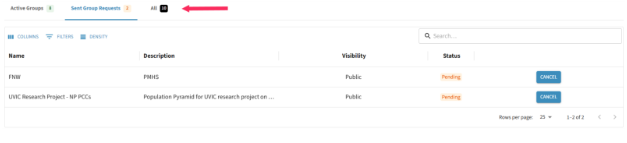
Your groups are now organized into tabs:
- Invites Received – Similar to the Sharing page, users can view all invitations to join a group in a dedicated space on top of the page.

- Active Groups – Users can view and manage their own groups.
- Sent Group Requests – Users can track activity on their requests to join public groups.
Create Groups:
You can now create a group and invite members or organizations at the same time to make the process easy and efficient.

3. New Notifications – Stay in the Loop
To help you quickly identify what’s new in the application, we’ve introduced a new notification tag system. A New tag will appear whenever you receive a sharing invite, a group invite, or an invitation to join a new organization, guiding you directly to where action is needed so you no longer have to search the application for updates.

4. New OSCAR EMRs
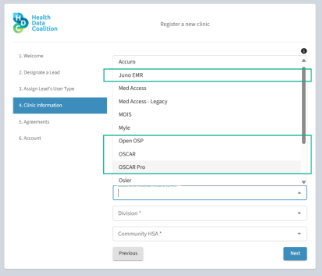
The EMR selection has been updated to include three additional OSCAR based service providers: Open OSP, Juno EMR, and OSCAR Pro, while continuing to support the generic OSCAR EMR.
Users registering a new organization will see all available options when selecting their EMR during registration.